Record any keynote.
Keep the best ideas.
International webinars often run in the middle of the night and in another language, and the speaker's best ideas fade as soon as you hear them. Two steps: press record before bed, hand it to Osmi when you wake up, and every keynote becomes notes you understand and quotes you can use.
Step 1
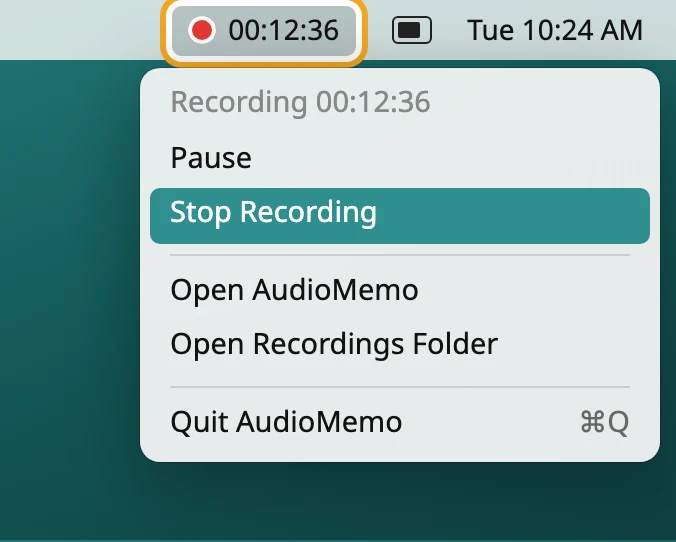
Join before bed and click Start Recording in the menu bar
Before bed, open the webinar link and join, then click the AudioMemo icon in the menu bar at the top of your screen and choose "Start Recording". When the icon turns into a red dot with a timer, it's recording. Leave your Mac on, keep it from sleeping, and go to bed: every word from the start of the webinar gets recorded. Click "Stop Recording" when you wake up.
Step 2
Send it to Osmi for a transcript in the original language and key notes
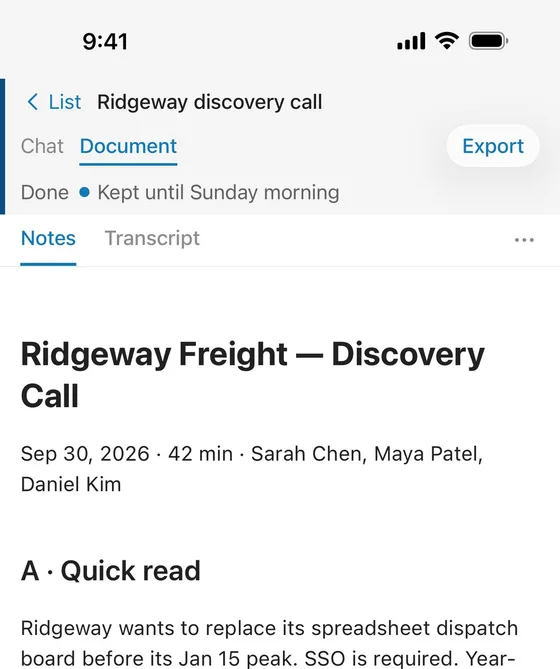
Click "Transcribe with Osmi" on that recording's row. The transcript keeps the speakers' exact words in the original language. Tell Osmi who each speaker is, pick the ideas you want highlighted, and the key notes are written in your notes language. Click "Export" in the top-right corner to save as PDF or Word; to quote a speaker, go back to the transcript for the exact line.
Tips
- Several speakers taking turns? Osmi asks you who's who, so the notes keep everyone straight.
- Download every session's transcript and notes into a "Conferences" folder, ready for your next report.
- No replay from the organizer, or the replay got taken down? Your own copy is still there.
Install from the Mac App Store, or download the DMG, open it and drag AudioMemo into your Applications folder. The first time you record, your Mac asks twice — to use the microphone and to record this computer's audio. Click Allow both times.